Lorem Ipsum can speed up early design work, but it can also hide weak spots in a layout. Learn which mistakes to avoid and how to test a design with realistic content.
Lorem Ipsum is useful placeholder text. It fills a design before the final copy is ready and helps you judge typography, spacing, and the overall rhythm of a page. The problem is not using it. The problem is trusting it more than the content the finished page will actually contain.
Placeholder text is unusually well behaved. Headings happen to fit, paragraphs fill the available space evenly, and cards line up neatly. Real content brings long names, missing details, awkward strings, and buttons that wrap on a small screen.
If you need to fill a few paragraphs quickly, use the Lorem Ipsum generator. Then test the design against the following mistakes.
1. Every block of text is the same length
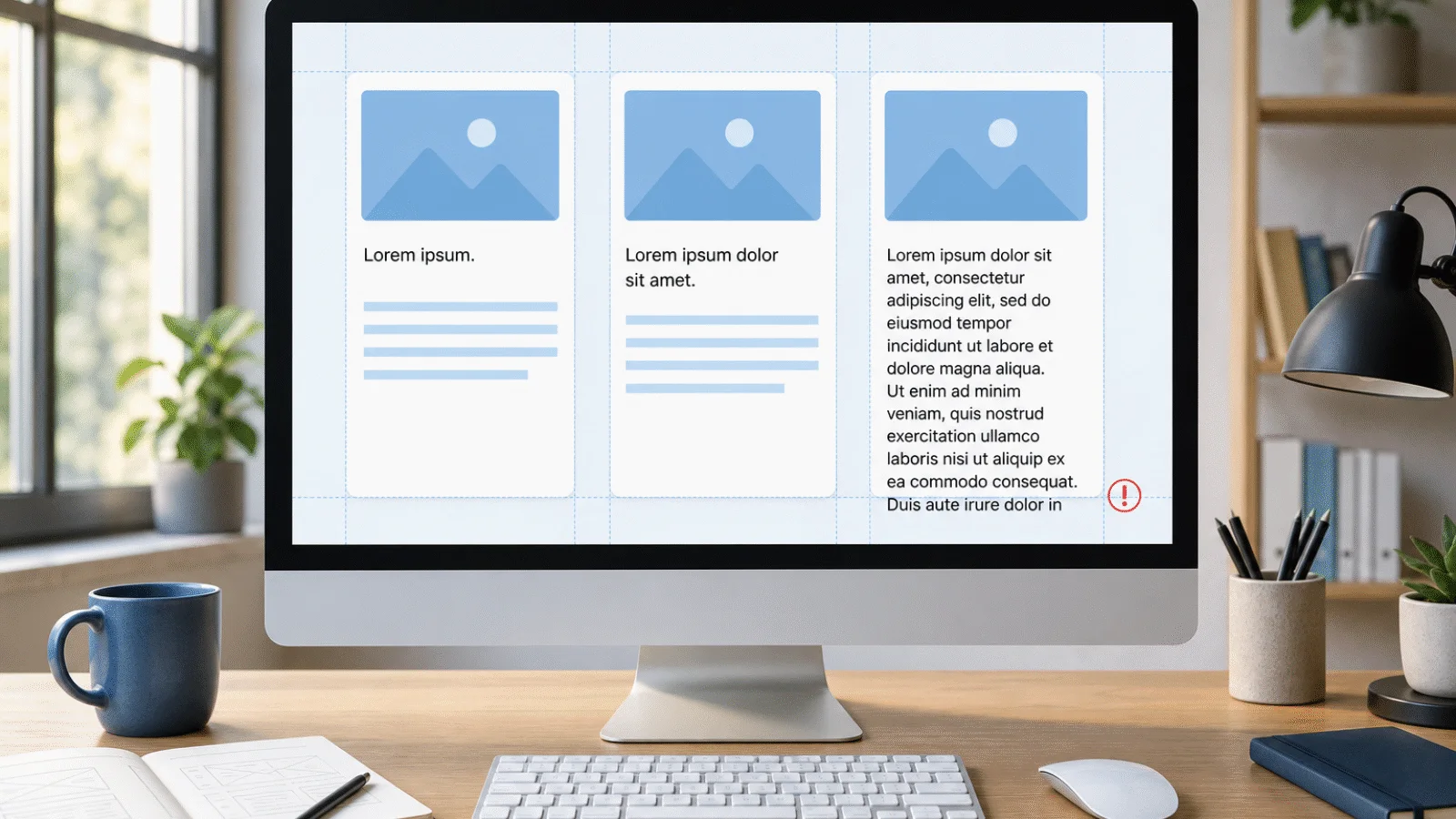
The most common mistake is filling every card with the same number of sentences. This does not show what happens when one product name fits on a single line and another takes three. It will not reveal a large empty space under a short description or a button pushed out of place by longer copy.
Test every repeating component with at least three versions:
- short: a one-word heading and a single sentence,
- typical: the length you expect in most cases,
- edge case: a long heading followed by several lines of text.
The edge case does not need to be absurd. It should resemble the longest real service, product, or article title that could reasonably appear on the site. If that content breaks the layout, the problem is in the design rather than the words.
2. Lorem Ipsum replaces text that should guide the user
A paragraph can temporarily be meaningless. Navigation, buttons, form headings, and error messages cannot. With these elements, you need to know whether people understand what will happen after a click and what they should do next.
Replace generic placeholder copy with a rough but realistic version: “Place order,” “Download the price list,” or “We could not send your email.” The wording does not have to be final, but it should describe the real action or message.
This reveals two things at once: whether the text fits and whether the interface makes sense. Latin filler text cannot test either one.
3. You only test the ideal state
A finished page will not always have every piece of information. A product may have no image, a user may have no profile photo, and a search result may have no description. A form also needs states for errors, successful submission, and loading.
Alongside typical content, check:
- a very long heading or an unbroken value,
- an empty description and a missing image,
- error and confirmation messages,
- a button with a longer label,
- a card with much more copy than the others,
- the same screen on a narrow phone.
Not every component needs to have the same height. What matters is that the information order remains clear, controls stay accessible, and text never covers another element.
4. Placeholder text hides a weak information hierarchy
Lorem Ipsum lets you judge the shape of a page. It cannot tell you whether visitors will find the price, deadline, key difference between services, or answer to their question. A visually tidy page can still present information in the wrong order.
As soon as you know the purpose of a screen, replace placeholder text in its key areas with working copy. Read only the headings, highlighted sentences, and buttons. If they do not explain what the page offers and what to do next, change the structure rather than merely polishing the wording.
Do not leave all copy until the end. Even a rough draft can change the order of sections, the width of components, and which details need to appear at all.
5. Lorem Ipsum reaches the live website
Placeholder text rarely reaches a live website on purpose. A designer adds it to a mock-up, a developer carries it into a template, and everyone assumes somebody else will replace it before launch.
Before publishing, search both the content and source files for lorem, ipsum, placeholder, TODO, sample, and test. Check less obvious places too: meta descriptions, image alt text, email templates, the footer, modal windows, and form messages.
If a page has no finished content, do not publish it or add it to the sitemap yet. The website launch checklist covers the other checks worth completing before a site goes live.
A practical workflow that avoids extra work
You do not need to stop using Lorem Ipsum. Give it a specific job instead:
- During early design, use it to assess paragraph density, typography, and the basic layout.
- In key interface elements, replace it with working headings, button labels, and messages as soon as possible.
- Before handoff, test short, typical, long, and missing content on both desktop and mobile.
- Before launch, search automatically for leftover placeholders and review the pages manually as well.
Summary
The biggest Lorem Ipsum mistake is not the placeholder text itself. It is designing only for its neat and convenient length.
Use Lorem Ipsum for typography and early layouts. Use meaningful working copy wherever content affects a user's decisions. Before launch, test long, short, and missing values too. That is how you find out whether the design works beyond the perfect mock-up.