
You keep hearing that 1234 is the most common PIN and wonder whether yours is just as easy to guess. We will show you the full list, the patterns attackers try first, how to pick a safe PIN and how to change it.
A PIN is usually just four digits, yet it protects your payment card, phone and SIM card. You enter it when you pay by card or withdraw cash, when you unlock your phone, and every time the phone restarts and the SIM asks for it.
News sites are again reporting that one in ten people uses 1234 as their PIN. The claim comes from an analysis of leaked passwords, not from bank data. In this article, we will go through the full list of the most common PIN numbers, what it means for a card that allows three attempts, which patterns attackers try first, how to pick a safe PIN, and how to change it on your card, phone and SIM card.
The 20 most common PIN codes
The most widely quoted list comes from an analysis of almost 3.4 million four-digit passwords from leaked databases, published in 2012 by Nick Berry of DataGenetics. Every combination from 0000 to 9999 appeared in the data.
| Rank | PIN | Share |
|---|---|---|
| 1 | 1234 | 10.713% |
| 2 | 1111 | 6.016% |
| 3 | 0000 | 1.881% |
| 4 | 1212 | 1.197% |
| 5 | 7777 | 0.745% |
| 6 | 1004 | 0.616% |
| 7 | 2000 | 0.613% |
| 8 | 4444 | 0.526% |
| 9 | 2222 | 0.516% |
| 10 | 6969 | 0.512% |
| 11 | 9999 | 0.451% |
| 12 | 3333 | 0.419% |
| 13 | 5555 | 0.395% |
| 14 | 6666 | 0.391% |
| 15 | 1122 | 0.366% |
| 16 | 1313 | 0.304% |
| 17 | 8888 | 0.303% |
| 18 | 4321 | 0.293% |
| 19 | 2001 | 0.290% |
| 20 | 1010 | 0.285% |
Together, these 20 most popular PIN codes make up 26.83% of all passwords in the data. If people chose at random, 20 combinations would cover just 0.2%. On its own, 1234 is more common than the 4,200 least-used combinations put together. The code 1004 in sixth place is popular with Korean speakers, because in Korean it sounds like the word for angel.
What this means when a card allows three attempts
The ranking matters most if someone finds or steals your card. A card is usually blocked after three wrong PIN entries, so a thief cannot try thousands of combinations.
If they go for the three most common codes, 1234, 1111 and 0000, they cover 18.61% of PINs in the data. If every PIN were random, three attempts would cover only 0.03%. The riskiest PIN codes are therefore those at the very top, because with three attempts an attacker rarely gets further down.
Phones allow more attempts but make you wait longer after each wrong one. On a phone with a four-digit code, an attacker can also work through the top 10, which covers 23.34% of codes in the data.
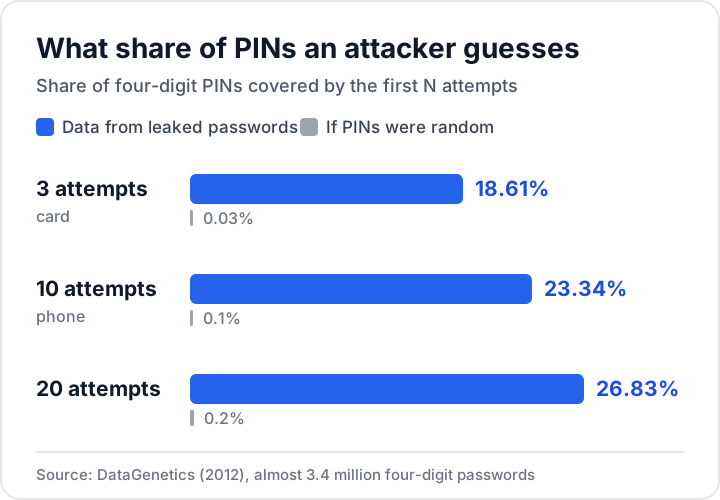
The data come from four-digit passwords, not bank cards. The author used them as a stand-in for PINs. Treat the percentages as an illustration of how people choose numbers, not as figures measured on real payment cards.
Patterns attackers try first
An attacker does not need the exact list, only to know how people pick numbers. These patterns keep coming up:
- The same digit repeated. Ten of the top 20 are like this, for example 1111, 0000, 7777 and 4444.
- Runs forward and backward. First place goes to 1234, and 4321 is 18th.
- Repeated pairs. These include 1212, 1313 and 1010, as well as 1122, where each digit is doubled.
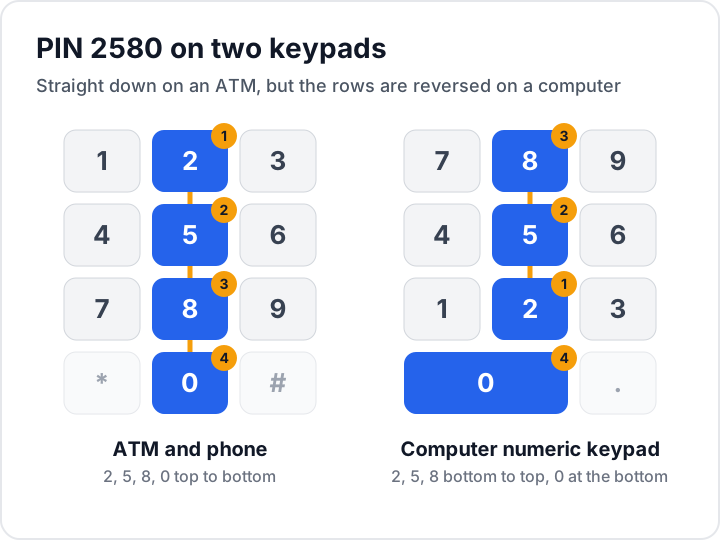
- The middle column of the keypad. The code 2580 is 22nd. It looks random, but on an ATM or phone keypad it runs straight down the middle. A computer's numeric keypad has the rows reversed, with 7, 8, 9 at the top, so the column runs the other way and 2580 is awkward to type. Its high rank suggests that people reused their card or phone PIN as a password.
- Years. The year 2000 is 7th, 2001 is 19th and 1984 is 26th. Years starting with 19 form a visible band in the data.
- Dates as day and month. DDMM and MMDD forms, such as your own birthday or that of someone close to you, form a distinct block in the data.
- Numbers from pop culture. The code 0007 is 23rd, 0070 is 28th and 6969 makes it all the way to 10th.
If your PIN matches any of these patterns, change it. Check it against this list in your head and do not type it anywhere, not even into a form that promises to check it for you.
Why picking the least-used PIN will not help
The list suggests the opposite: pick a PIN that almost nobody uses. In the analysis, the least-used PIN was 8068, which appeared only 25 times among almost 3.4 million passwords.
The author of the analysis warned that once a "rare" PIN is published, attackers move it higher up their list. The same goes for any PIN you choose because it seems unusual. If you could reason your way to it, someone else can too.
So the safest PIN is not a rare one but a random one. A random PIN has nothing to do with you and gives an attacker nothing to start from.
How to pick a safe PIN
When deciding what PIN to use, stick to these rules:
- Random, not based on anything about you. Do not use your house number, the last digits of your phone number, your license plate or part of an ID number.
- No dates, years, runs or patterns. Avoid your own dates and other people's, and stay away from keypad shapes such as 2580.
- At least 6 digits on your phone. Six digits give you 1,000,000 combinations instead of 10,000. If your device allows a longer PIN, use it.
- A different PIN for your card, phone and SIM. Anyone who learns one of them does not automatically get the others.
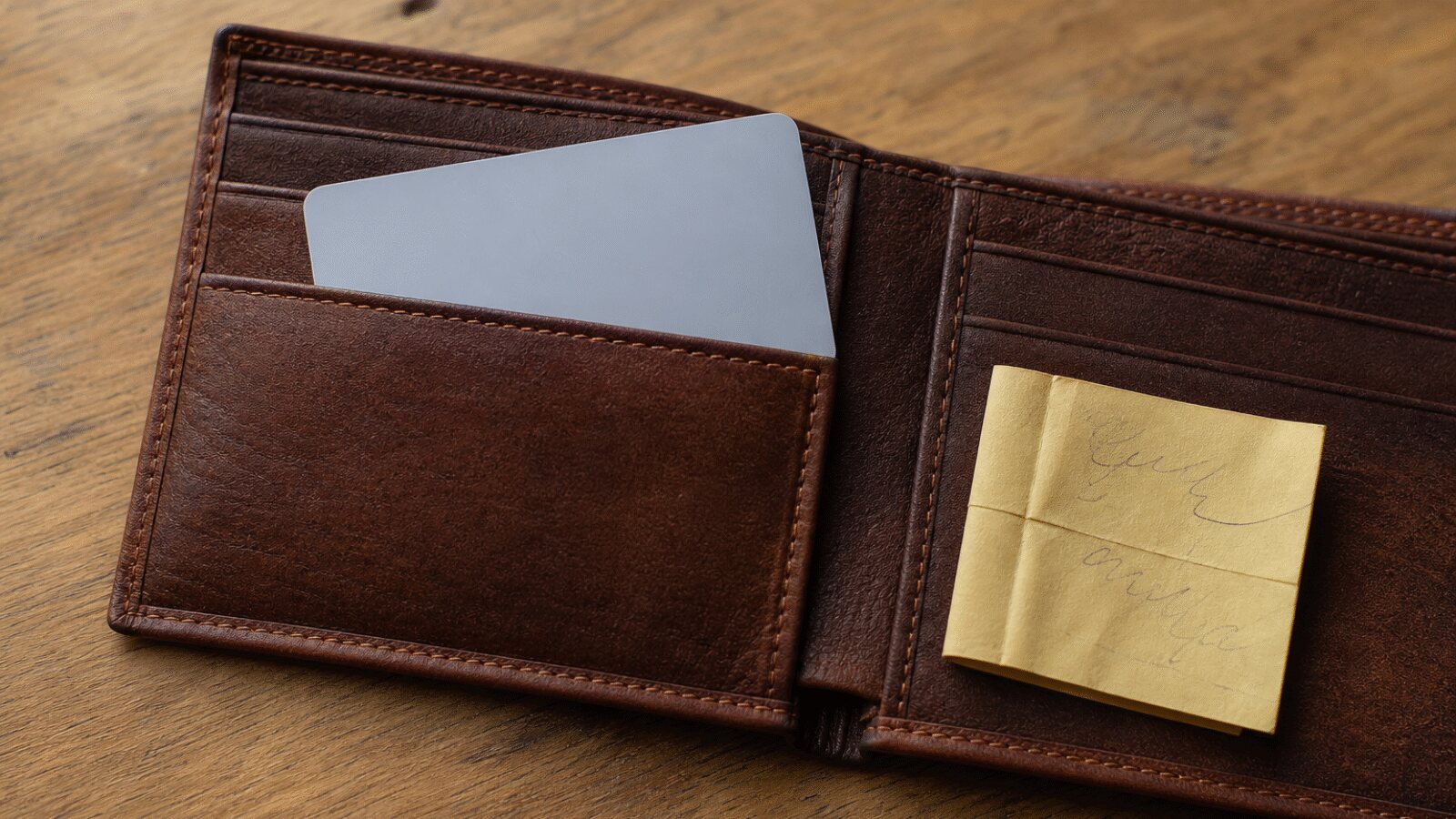
- Do not write your PIN on the card or carry it in your wallet. A note with the PIN next to the card makes it pointless.
Our PIN generator creates a random PIN of 4 to 12 digits, with 6 as the default. The digits come from your browser's cryptographic random number generator, and the PIN is never sent or stored anywhere. The generator throws away easy-to-guess codes and draws new ones: repeated digits and blocks (1111, 123123), runs up and down (1234, 9876), four-digit years, dates and popular combinations such as 2580 or 147258. The real number of possibilities is therefore slightly lower than the theoretical one.
Practical tip
Generate a random PIN
The generator skips runs, repeated digits, dates and birth years. The PIN is created in your browser.
You can memorize a random PIN by repeating it several times over a few days. If you would rather not rely on memory, save it in a password manager. Our article How to create a strong password covers similar rules for passwords.
A six-digit PIN is not automatically safe
A longer PIN only helps if the digits are random. The analysis also covered six-digit passwords, with a similar result. On its own, 123456 makes up 11.684% of six-digit passwords, an even bigger share than 1234 has among four-digit ones. It is followed by 123123 (1.370%), 111111 (1.296%), 121212 (0.623%), 123321 (0.591%), 666666 (0.577%), 000000 (0.521%) and 654321 (0.506%).
All eight are built on the same patterns as four-digit PINs: runs, repetition and mirroring. The code 123456 is one of the first an attacker will try, so a phone locked with it is less protected than one with a random four-digit PIN.
How to change your PIN on a card, a phone and a SIM card
Card. Many banks let you change your PIN in the card details of their mobile app. Other banks allow it only at their own ATMs, and some apps only let you view the PIN. If you cannot find it in the app, call your bank's customer service line.
Phone. Open Settings and find the lock screen section. On an iPhone, it is Face ID & Passcode or Touch ID & Passcode, depending on the model. Choose at least six digits. If you pick an easy-to-guess code, your iPhone will warn you. Do not ignore the warning.
SIM card. You can change your SIM PIN in your phone's settings, under SIM card or security. You will need your current PIN. After three wrong attempts, the SIM card asks for a PUK code. You will find it on the plastic card your SIM came in, or in your mobile operator's app.
Frequently asked questions
What is the most common PIN number?
The most common PIN is 1234. In the analysis of leaked databases, it made up 10.713% of all four-digit passwords, roughly one in ten. Second place went to 1111 and third to 0000. If you use any of these three codes, change it.
Is a PIN based on my date of birth safe?
No. Dates are among the first things an attacker may try, and your date of birth is easy to find on social media or on the ID cards in a stolen wallet. Your partner's or children's birthdays, or just your birth year, are just as weak.
Is a four-digit or a six-digit PIN better?
A six-digit PIN, as long as it is random. For a card, the length is usually up to your bank, but you choose it on your phone, so go for at least six digits. Codes like 123456 or 111111, however, are among the first an attacker tries, just like 1234.
What should I do if I forget my card PIN?
Contact your bank through its mobile app or official customer service line. Depending on the bank, it will show you the PIN in the app or issue a new one. Do not try to guess it. After three wrong attempts, the card is usually blocked.
Can my bank or mobile operator ask for my PIN by phone or email?
No. Your bank and mobile operator will never ask for your PIN by phone, email or text message, so anyone who does is a scammer. If you have given away your card PIN, block the card in your app or contact your bank. For a SIM PIN, contact your operator, and change a leaked phone unlock code straight away.


